Comic and manga page sizes: B5, A4, comic book and webtoon
Before you draw the first panel, it pays to settle the page size. If you change it at the end, panels and balloons no longer land where they should, and the printer trims what it should not. This guide explains the sizes of the most common formats and how GalionToon gets the page ready to print or to publish as a vertical strip.
The four lines of a printed page
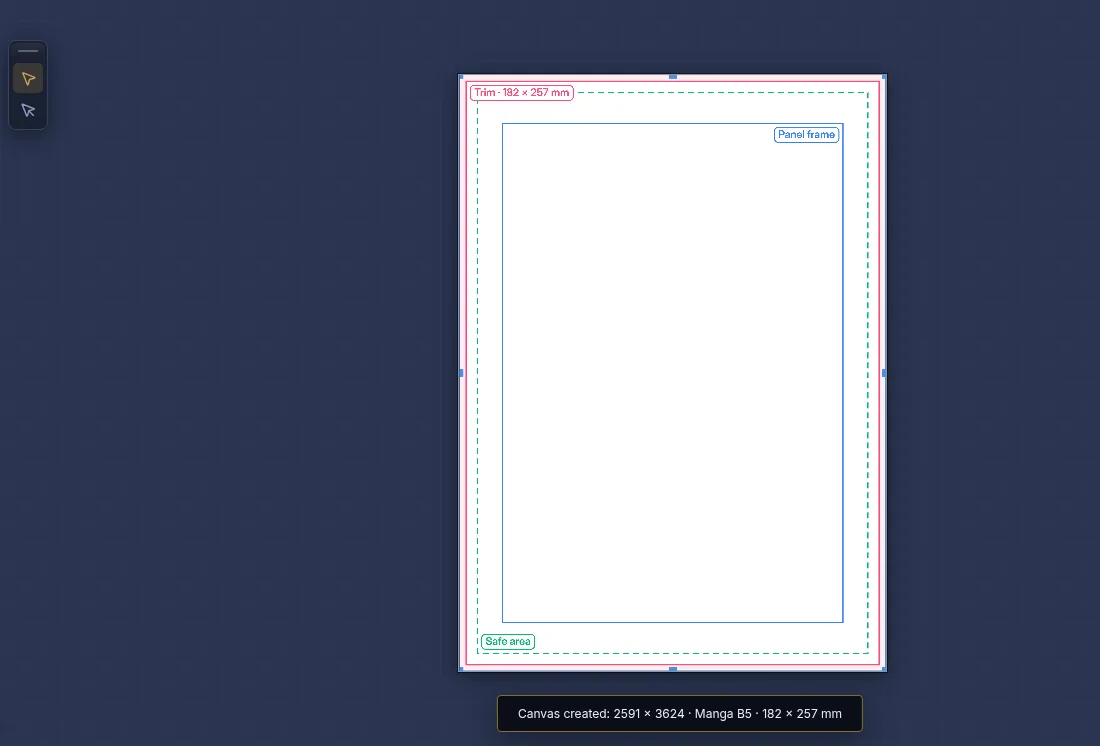
A page that goes to print is not one rectangle but four, one inside the other. GalionToon draws them on the canvas, each with its own color and name.
- Bleed (the edge of the canvas): a few extra millimeters around the page. The guillotine never cuts exactly, and if the artwork stopped right at the trim, thin white lines would show at the edge. Anything that reaches the edge is painted all the way out here.
- Trim (pink): the final size of the page, the size of the book.
- Safe area (green, dashed): nothing inside it gets lost to the cut or the spine. Text and balloons always go inside.
- Panel frame (blue): where the regular panels go. What lies between the frame and the trim is the white margin of the page.
Sizes of each format
| Format | Page (trim) | Bleed | Safe area | Resolution |
|---|---|---|---|---|
| Manga B5 | 182 × 257 mm | 3 mm | 5 mm | 350 ppi |
| Manga A5 (pocket) | 148 × 210 mm | 3 mm | 5 mm | 350 ppi |
| B4 originals | 220 × 310 mm | 5 mm | 6 mm | 300 ppi |
| A4 comic | 210 × 297 mm | 3 mm | 5 mm | 350 ppi |
| Comic book | 6.625 × 10.1875 in | 0.125 in | 0.25 in | 300 ppi |
| European album | 240 × 320 mm | 5 mm | 8 mm | 300 ppi |
| Webtoon | 800 px wide | — | 60 px margins | screen resolution |
The B5, A5, comic book and webtoon values are the ones most printers and platforms use. There is no single standard for A4, the album or B4 originals: those are safe values. Always ask your printer.
- B5 is the size of manga magazines and Japanese fanzines. A5 is close to the pocket volume.
- B4 originals is the paper manga is drawn on before it is reduced to B5: if you are printing in B5, draw in B5.
- 350 ppi is the usual resolution for line art and screentones. With less, thin edges look jagged in print.
Setting up the page in GalionToon
- Open galiontoon.com, go into Galion Photo and choose File → New.
- In the Comic / Manga category, pick a template. Each card shows its size, bleed and resolution, for example “182 × 257 mm + 3 mm bleed · 350 ppi”.
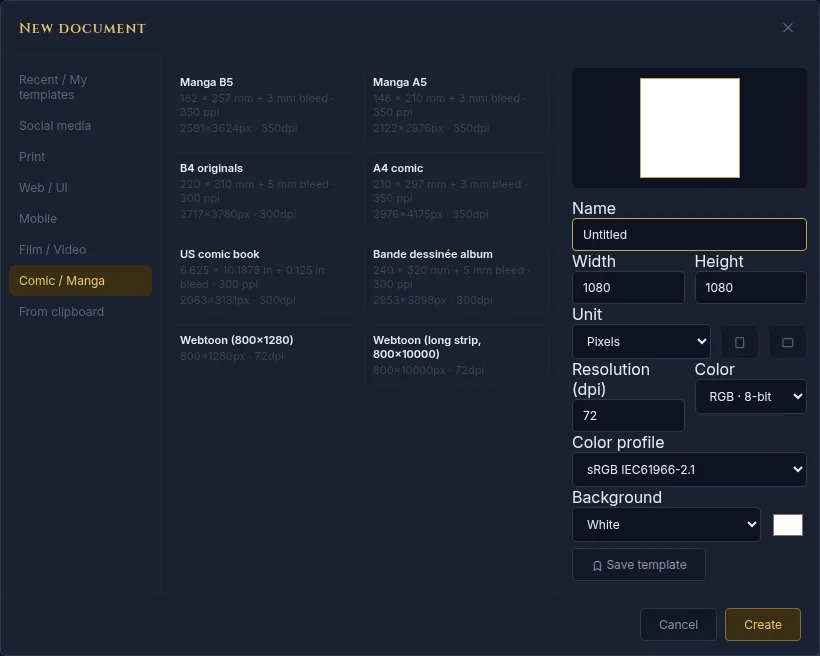
The comic templates already include the bleed on the outside: a B5 measures 2591 × 3624 px. - Click Create. The canvas measures the page plus the bleed, and you will see the trim, the safe area and the panel frame on it.
- To change the format or adjust a measurement, click the format button in the status bar at the bottom, or use Image → Page format…. There you choose the format, mm or inches, the resolution, and set the size, bleed, safe area and frame with a live preview.
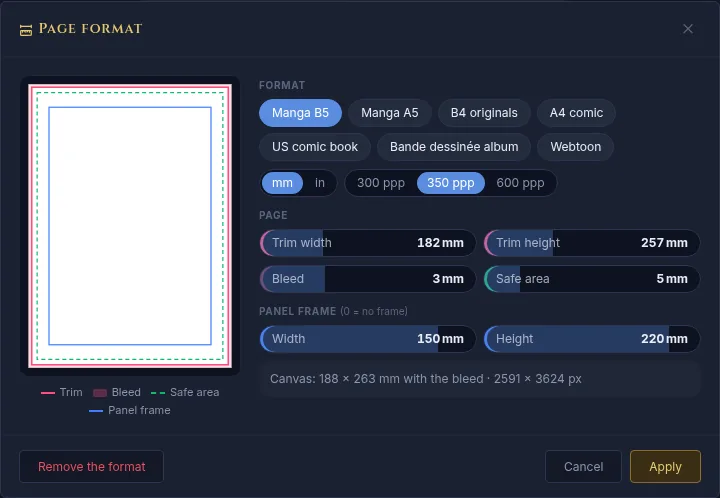
Page format: the preview shows how the drawing will sit before you apply it. - Click Apply. The drawing is not stretched: paper is added or removed around it, centered. If something is going to fall outside, the window warns you first. Ctrl+Z undoes it in one step.
The webtoon format
A webtoon is not printed: it is read on a phone by scrolling down. So it has no trim or bleed, just a fixed width of 800 px and a strip as long as you need.
- GalionToon marks the 1280 px sections the strip is usually uploaded in, numbered, and 60 px margins on the sides so text never touches the edge of the screen.
- When exporting, Area: In 1280 px slices saves a .zip with the images in order.
- The guide How to make a vertical webtoon walks through it step by step.
Exporting for print
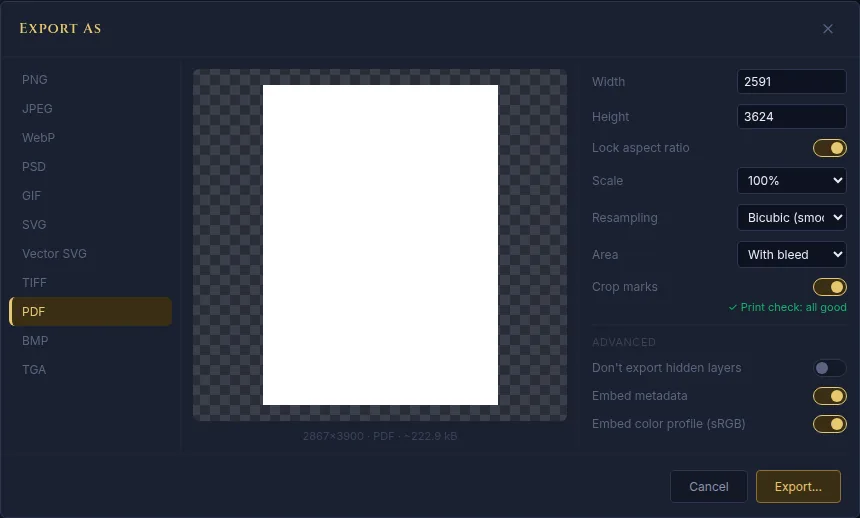
- In File → Export As…, the Area decides what comes out: With bleed (what printers usually ask for), Up to the trim (to read on screen) or a Selection.
- Crop marks adds 10 mm around the page with marks in the corners that line up with the trim.
- The PDF comes out at its real size, with the trim box and the bleed box inside the file.
- Before exporting, GalionToon checks the page: it warns about balloons or text outside the safe area, panel borders that end close to the trim and a resolution below 300 ppi.
If your work has several pages, the Page book (File → Page book → New book…) exports them together: one PDF with one page per page, numbered images or a CBZ for reading.
Common problems
- The printer says the bleed is missing. The artwork or the background stops at the trim. Paint them out to the edge of the canvas or, if the page had no format, open it with Image → Page format… to add the bleed.
- A balloon got cut off in the book. It was outside the safe area. With the Speech balloon tool, a balloon that sticks out turns orange, and the export check warns about it.
- The line art looks jagged in print. The page has less resolution than it seems. Work at 350 ppi from the start: raising it at the end adds no detail.
- Colors look duller on paper. A screen shows more colors than ink can. GalionToon exports in RGB; if the printer asks for CMYK, it usually converts the file itself: ask for a proof.
Common questions
What size is a manga? Magazines and fanzines are B5 (182 × 257 mm). Pocket volumes are close to A5 or B6, depending on the publisher. If you print it yourself, B5 at 350 ppi is the safe choice.
Can I change the size after drawing? Yes, with Image → Page format…. The drawing is not distorted, but if the page gets smaller, whatever is at the edge falls outside. It is better to decide at the start.
Do I have to draw on B4 like professionals? No. B4 is the paper for originals that are later reduced. Digitally, draw straight at the size you will print.
What is the spine and why does it matter? It is the side where the book is bound. Whatever is close to it gets lost when the book is opened, which is why the safe area leaves room there too.
Does it work on a phone? Yes. On a phone, the templates are in the same new document window, and the format is changed with Image → Page format….
More guides
- How to make your first manga page in your browser6 min read
- How to make a vertical webtoon to read on a phone5 min read
- Speech balloons and speed lines for your comic5 min read
- How to import your custom brushes4 min read
- How to remove the background from a photo in your browser5 min read
- How to open and save a PSD file in your browser4 min read
- How to make your first animated pixel art3 min read
- How to add subtitles to a video in your browser3 min read
- How to edit your first video in your browser4 min read
- How to make a YouTube thumbnail for free in your browser4 min read
- How to crop a photo into a circle for your profile picture4 min read
- How to put text on a photo so it can be read4 min read
- Layer masks: what they are and how to use them4 min read
- How to resize an image for social media without losing quality4 min read
- How to make an Instagram post step by step4 min read
- How to create a sprite sheet for a video game4 min read
- Free fonts for commercial designs: how to choose them5 min read
- How to animate a character with bones in Galion Rig4 min read
- How to convert a drawing or a logo into a vector (SVG)4 min read